
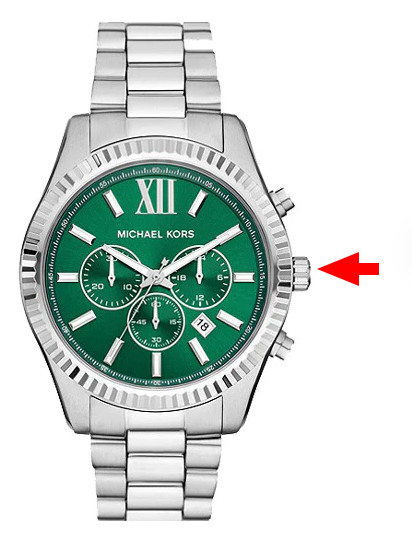
Michael Kors watches combine fashion and functionality, offering a wide range of models including classic analog watches, chronographs, and smartwatches. While the design may vary, most Michael Kors watches use a simple crown-based system to adjust the time.
If you are unsure how to set the time on your Michael Kors watch, this guide will walk you through the process step by step.
How to Set Time on a Michael Kors Watch
Most Michael Kors watches are analog and use a two-position crown.
Step-by-step instructions
- Locate the crown on the side of the watch
- Pull the crown out to the second position
- Rotate the crown to adjust the hour and minute hands
- Push the crown back in to save the time
This method works for most Michael Kors watches.
How to Change Time on a Michael Kors Watch
To change the time later:
- Pull the crown to the second position
- Rotate to adjust the time
- Push the crown back to confirm
How to Set Date on a Michael Kors Watch
Many Michael Kors watches include a date display.
Steps
- Pull the crown to the first position
- Rotate the crown until the correct date appears
- Push the crown back in
⚠️ Avoid changing the date between 9 PM and 3 AM, as this can damage the mechanism.
How to Set Time and Date on a Michael Kors Watch
- Pull the crown to position 1 → set the date
- Pull to position 2 → set the time
- Push the crown back to save
How to Set a Michael Kors Watch with 3 Dials (Chronograph)
Chronograph models include extra subdials, but the main time is still controlled by the crown.
Steps
- Pull the crown to the second position
- Rotate to set the time
- Push the crown back
Important
- The side buttons control the stopwatch, not the main time
- Subdials may show seconds, minutes, or stopwatch functions
How to Set Michael Kors Watch Chronograph
If your chronograph hands are misaligned:
- Pull the crown out
- Use push buttons to reset chronograph hands
- Push the crown back
(This depends on the model, but applies to most MK chronographs.)
How to Set Time on a Michael Kors Smartwatch
Michael Kors smartwatches (Access series) work differently.
Steps
- Time is set automatically via Bluetooth
- Connect the watch to your smartphone
- The time syncs with your phone
If needed, adjust time in the watch settings app.
Michael Kors Watch Crown Positions
| Position | Function |
|---|---|
| Position 0 | Normal operation |
| Position 1 | Date adjustment |
| Position 2 | Time adjustment |
Popular Michael Kors Watches and Time Setting
| Model | Type | Time Setting Method |
|---|---|---|
| Michael Kors Parker | Analog | Crown adjustment |
| Michael Kors Runway | Analog | Crown adjustment |
| Michael Kors Lexington | Chronograph | Crown + pushers |
| Michael Kors Bradshaw | Chronograph | Crown adjustment |
| Michael Kors Access | Smartwatch | Automatic sync |
Common Problems When Setting Time
The date changes at noon
The watch is set 12 hours off – rotate hands another full cycle.
The crown feels stuck
Pull gently but firmly – do not force it.
Chronograph hands are not aligned
They may need manual reset using push buttons.
Quick Answer (Featured Snippet)
To set the time on a Michael Kors watch:
- Pull the crown to the second position
- Rotate the crown to adjust the time
- Push the crown back in to save
Final Thoughts
Setting the time on a Michael Kors watch is simple once you understand how the crown works. Whether you have a classic analog model, a chronograph, or a smartwatch, the process is straightforward and takes only a few seconds.