
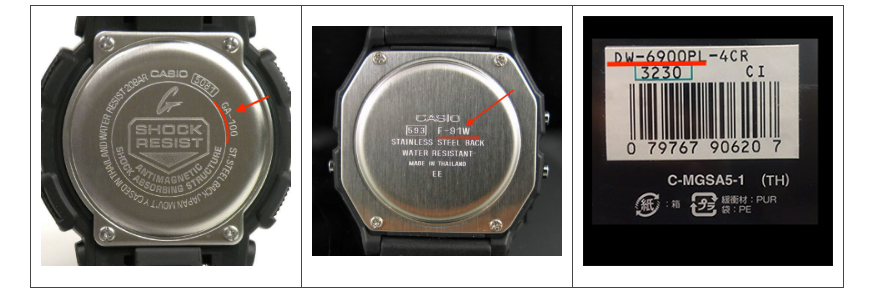
Start with the four-digit module number, not the color name. Casio can sell several visually similar watches under one family name while using different modules. The module is printed inside a small box on the case back and is the safest key for confirming a replacement cell.
- Read the complete model and boxed module number from the case back.
- Search the finder by model, module, or battery code.
- For rows marked Official, open the Casio specification and compare the module.
- Before ordering, compare the result with the marking on the installed cell.
Casio Battery Finder
Search by model, battery code, or the 4-digit module number engraved in the box on the case back. Hyphens and spaces are optional.
| Model | Battery | Module | Power system | Rated life | Verification |
|---|
Database updated September 2026: 1,480 unique Casio references. Forty-four current variants across nine families were added or verified against Casio product specifications and operation guides.
Model number vs module number: which one matters?
The model identifies the watch sold in stores—examples include GA-010-1A or ABL-100WE-1A. The module identifies the electronic movement and operating specification. On most Casio case backs it appears as three or four digits inside a rectangle. If the family name and module point to different batteries, trust the module documentation and the cell physically installed in the watch.
Color suffixes usually share the same module, which is why the new finder groups verified color variants under one specification. Production changes are still possible, especially with older references, so an unverified legacy row intentionally shows “Verify case-back module” instead of pretending the database is certain.
What the battery codes mean
| Code family | What it is | Where it is common | Important note |
|---|---|---|---|
| CR (CR2016, CR2025, CR2032) | 3 V primary lithium coin cell | Digital watches, alarms, backlights, Bluetooth models | Do not recharge it and do not substitute a rechargeable CTL cell. |
| SR (SR621SW, SR920W, SR927W) | 1.55 V silver-oxide cell | Analog and analog-digital quartz movements | W and SW versions are designed for different drain profiles; match the exact marking. |
| CTL / ML | Rechargeable storage cell | Tough Solar and other solar-powered Casio watches | Charge the watch fully and diagnose the charging system before replacing the cell. |
| ×2 or “multiple cells” | Two-cell arrangement | Some older analog-digital modules | Replace only with the exact combination specified for the module. |
Recently added and officially checked Casio families
The 2026 update adds current references that were missing from the migrated database:
- GA-010 / GD-010 / GA-V01: CR2025, with an approximate 10-year rating under Casio’s stated test conditions.
- DW-5000R: module 3576, CR2016, approximately five years.
- WS-B1000 and ABL-100WE: connected step-tracking models using CR2016, approximately two years.
- GBA-950: module 5737, CR2025, approximately two years with Casio’s defined Bluetooth and activity-use pattern.
- LF-20W: module 3551, CR1616, approximately three years.
- WS-1700H: module 3562, CR2025, approximately ten years.
A rated life is a laboratory estimate, not a promise. Frequent illumination, alarms, Bluetooth synchronization, sensor use, cold temperatures, and storage history can shorten real service life.
Before assuming the battery is dead
A blank display often does mean a depleted cell, but not always. A Tough Solar watch may simply be deeply discharged after months in a drawer. Give it sustained bright light according to its charging guide before opening the case. If an analog-digital model has hands that disagree with the display, hand alignment—not the battery—may be the problem. Condensation, corrosion, impact damage, or a stuck button also need repair rather than a new cell.
What a careful battery replacement includes
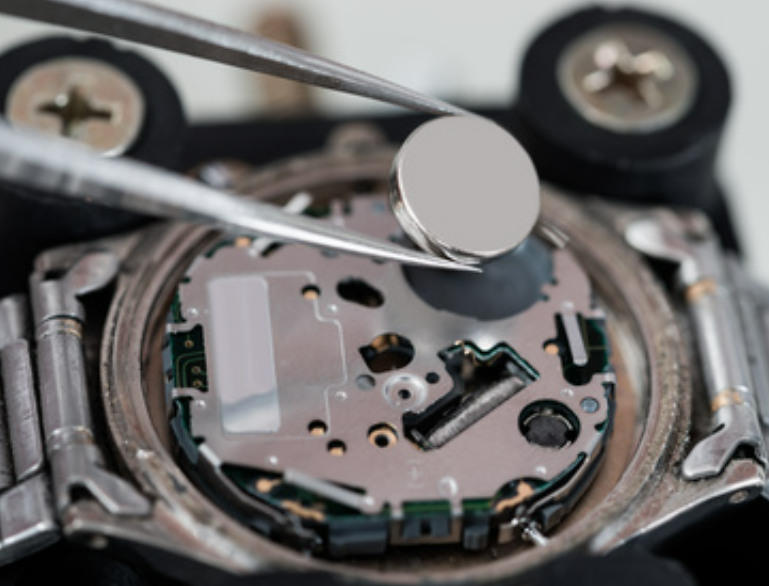
- Photograph the case back and note the module before removing anything.
- Use a non-magnetic plastic tool where practical and avoid shorting the new cell.
- Inspect the gasket for flattening, cuts, dust, or twisting. Replace it when damaged.
- Perform the module’s AC reset if the service instructions require it. A new cell can appear dead until the reset contact is completed.
- Confirm the display, hands, alarm, illumination, and buttons before closing the case.
- If water resistance matters, have the watch pressure-tested after resealing.
Opening a watch can compromise its seal. For dive use, swimming, a valuable model, or any case with corrosion, an authorized service center or competent watchmaker is the sensible option.
Tough Solar cells are not ordinary batteries
Casio solar watches use a rechargeable storage cell charged by the dial’s solar panel. A CTL or ML cell should not be replaced with a disposable CR battery just because the dimensions look similar. Before replacing a solar cell, rule out insufficient charging, a covered solar panel, or a fault in the charging circuit.
Frequently asked questions
Can two Casio watches with similar names use different batteries?
Yes. The case style may stay similar while the internal module changes. The boxed module number and official guide are more reliable than appearance.
Can I use CR2025 instead of CR2016?
No. Both are 3 V lithium cells, but their thickness differs. A thicker cell can damage the holder or case; a thinner one may lose contact.
Why does the watch still not work after replacement?
Check polarity, contact cleanliness, retaining clips, and whether the module requires an AC reset. Stop if you see leakage or corrosion.
Do I need to replace the gasket?
Not automatically, but it must be clean, undamaged, correctly seated, and lightly treated only with a compatible lubricant. Pressure testing is the only meaningful confirmation of restored water resistance.
Where should an old watch battery go?
Use a local battery-recycling or household hazardous-waste collection point. Keep loose cells away from children and prevent the terminals from shorting during storage.
Primary sources used for this update
New rows were checked against Casio’s official product specifications and operation-guide records for modules 5735, 3569, 3576, 3564, 3565, 5751, 5737, 3551, and 3562. Specifications can change; always check the guide attached to your exact module.
You’re really helping me