
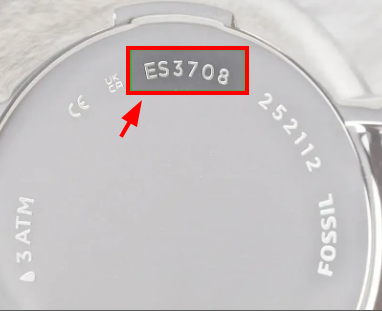
Start with the style number on the case back. Fossil watches that look similar can use different movements and different cells. Enter the complete code—such as JR1401, ES5424, BQ2494, or FTW1202—then compare the result with the marking on the installed battery before ordering.
- Read the complete style number engraved on the back.
- Search it in the finder below; spaces and hyphens are ignored.
- Open the Fossil specification when a row is marked Official.
- If the case has already been opened, confirm the code printed on the old cell.
Fossil Watch Battery Finder
Search the style number engraved on the case back. Verified rows link directly to Fossil’s own product specification.
| Model | Battery | Movement / platform | Power system | Verification |
|---|
Database updated September 2026: 418 unique Fossil references. The original Techsolving dataset was transferred, the broken script was isolated from theme JavaScript, and 45 entries are now linked to Fossil product specifications.
What changed in this Fossil battery database
The update adds current Crosby, Everett, Gilmore, Pearson, Machine Big Tic, Y2K Big Tic, Karli, Harlow, and Accomplice models that were absent from the migrated table. It also corrects several rows where a movement-family guess disagreed with Fossil’s own product specification.
| Model | Old entry | Corrected battery | Fossil platform |
|---|---|---|---|
| JR1401 | SR621SW | SR920SW | Nate Chronograph |
| CH2564 | SR920SW | SR621SW | Coachman Chronograph |
| CH2891 | SR920SW | SR621SW / 364 | Coachman Chronograph |
| BQ2364, BQ2457, BQ2494, BQ2799 | SR927W | SR927SW | Multifunction |
How to read a Fossil model number
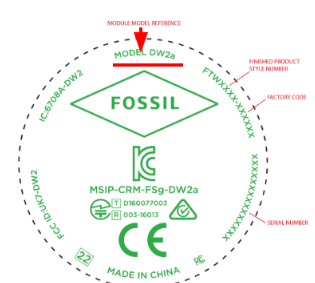
Traditional Fossil watches commonly use codes beginning with FS, ES, JR, CH, BQ, or ME. Hybrid and connected watches often use FTW. Limited editions can use LE. The collection name alone—Machine, Grant, Nate, Raquel, or Everett—is not a safe battery identifier because the same collection may contain three-hand, chronograph, multifunction, automatic, and analog-digital versions.
Battery codes you will see most often
| Code | Type | Typical use | Substitution warning |
|---|---|---|---|
| SR621SW / 364 | 1.55 V silver oxide | Many three-hand and chronograph movements | 364 is the common retail number for SR621SW. |
| SR626SW / 377 | 1.55 V silver oxide | Many smaller three-hand watches | Match the exact height and chemistry. |
| SR920SW / 371 | 1.55 V silver oxide | Selected chronographs | Do not choose it only because the case is large. |
| SR927SW / 395 | 1.55 V silver oxide | Multifunction and selected date movements | W and SW indicate different drain profiles; use Fossil’s specified version. |
| CR2016 | 3 V lithium | Big Tic and analog-digital watches | Do not replace it with a same-diameter cell of different thickness. |
| CR2412 / CR2430 | 3 V lithium | Some hybrid watches | Hybrid generations vary; confirm the exact FTW number. |
Hybrid, smartwatch, and automatic models
A hybrid with physical hands may use a replaceable lithium coin cell, while a touchscreen smartwatch normally contains a rechargeable battery pack that is not serviced like a traditional button cell. Automatic ME-series watches have no battery at all. If a hybrid will not reconnect after replacement, check polarity, the reset or pairing procedure, and the exact generation before assuming the new cell is faulty.
Before closing the case
- Check polarity and make sure the retaining spring is seated without touching the wrong contact.
- Inspect the gasket for dust, cuts, flattening, or twisting.
- Confirm the hands, date, chronograph, buttons, and display before fitting the back.
- Pressure-test the watch after service if water resistance matters.
- Keep loose button cells away from children and take used cells to an appropriate battery-recycling point.
Sources and verification scope
Rows marked Official link to Fossil product pages that state the style number, movement or platform, and battery type. Examples include JR1401, CH2564, FS6121, and FTW1202. Legacy rows without a Fossil link remain useful search references but are deliberately labelled for confirmation against the old cell or movement.